
.png)


.webp)



.webp)
.webp)
.webp)
.webp)
.webp)


.webp)










f you've spent any time trying to grow your photography business on Instagram, you've probably run into the same problem as everyone else: you only get one link. One. You've got a portfolio to show off, a booking page to fill, packages to explain, a contact form to fill out, and somehow all of that has to squeeze through a single URL in your bio.
So you did what most photographers do. You signed up for Linktree, dropped a few links on a plain-looking page, and called it done.
Here's the thing though… that approach might be costing you clients. Not because Linktree is broken, but because it was built for everyone, and you are not everyone. You're a photographer. Your work is visual, your brand is built on how things look, and when someone taps your bio link and lands on a generic list of blue buttons, that first impression does not match the quality of the work you've spent years developing.
There's a better option, and it was built specifically for photographers like you.
.jpg)
What a Link in Bio Tool Actually Needs to Do
Before we talk about switching, it helps to get clear on what you actually need from a link in bio tool.
At the most basic level, it needs to hold links. But for a photographer trying to book clients, it should do a lot more than that. It should show off your beautiful work. Potential clients are making a visual decision, and if the first thing they see after clicking your bio link is a wall of text links, you've lost the momentum you built with your feed.
Your link in bio should reflect your brand. Colors, fonts, and the overall feel should match the experience you've created everywhere else. A generic template does not do that. It should support your business goals. Whether that's booking sessions, selling prints, collecting inquiries, or growing an email list, the tool should make those paths obvious and easy for visitors.
Most generic link in bio tools cover the first point and not much else. That's the gap CloudSpot's Social Site was designed to fill.
Why Linktree Falls Short for Photographers
Linktree is a fine product for many people, but photographers are in a different situation.
Your entire business is built on visual trust. A potential client is deciding whether to hand over real money for something they can't fully evaluate until after the fact. They're trusting that you'll show up, that you'll make them look good, that the experience will be worth it. That trust starts building the moment they find you, and it keeps building or breaking with every interaction after that.
A link in bio page that looks like it was thrown together in a few minutes sends a subtle but real signal. It says: I didn't put much thought into this. That's not the message you want to send.
Beyond aesthetics, Linktree also has some practical limits that start to matter as your business grows. The free plan puts Linktree branding on your page, and meaningful customization is locked behind a paid subscription. That means you're paying extra for a standalone tool that does one thing, when that same budget could go toward a platform that manages your entire photography business.
What Makes CloudSpot's Social Site Different
CloudSpot built Social Site specifically for photographers, and the difference shows up immediately.
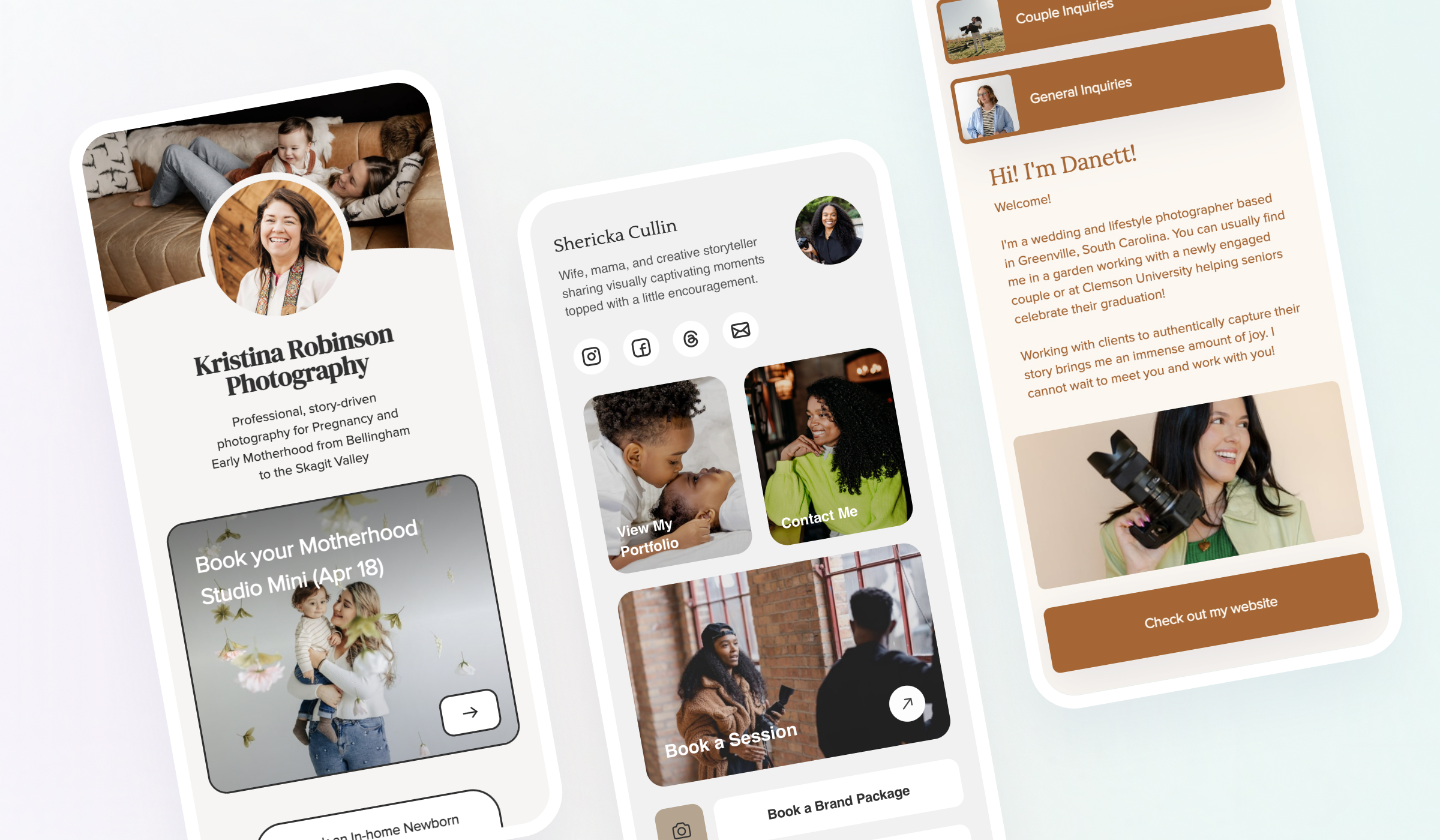
📸 It leads with your photos. Instead of a list of links, Social Site is designed to showcase your work front and center. Your images load beautifully, and your links sit within that visual context rather than replacing it. Visitors see your photography first, which is what actually makes them want to click anything at all.
📸 It matches your brand. You can customize your Social Site to reflect your actual brand identity. That means the page someone lands on after clicking your bio link feels like a natural extension of your feed and your website, not a detour into a generic template.
📸 It lives inside CloudSpot. This is a big one. If you're already using CloudSpot to run your photography business, Social Site is not another tool you have to pay for separately, log into separately, and manage separately. It's built in. Your link in bio is part of the same platform you use for galleries, client communication, and everything else.
📸 You don't need any technical skills to use it. Setting up your Social Site takes about fifteen minutes. You pick your layout, add your links, drop in your images, and you're done. No code, no complicated settings, no third-party integrations to troubleshoot.
Making the Switch from Linktree
If you're currently using Linktree and you're ready to switch, the transition is simple.
Start by checking which links you currently have active on Linktree. Copy those URLs somewhere so you have them handy. Then set up your Social Site with the same links, plus any others you've been meaning to add.
Once your Social Site is published, go into Instagram and update your bio link. If you want to be thorough, you can also check any other places you've shared your Linktree URL, like your website, your email signature, or your Facebook bio, and update those as well.
The whole process is quick, and you'll likely notice right away that the page looks significantly more professional than what you had before.
What to Put on Your Social Site
A lot of photographers overthink this. Keep it focused. More links do not mean more conversions. In fact, giving people too many choices usually leads to them choosing nothing.
Here are the links most photographers should have:
➡️ Your booking page or lead form should be first. If someone is on your page, they're already interested. Make it as easy as possible for them to take the next step.
➡️ Your portfolio or website comes next. This is for people who want to see more of your work before making a decision. Show off that beautiful work!
➡️ Your most recent or most relevant gallery type, like family sessions, wedding work, or brand photography, can help visitors self-identify. If they're looking for a newborn photographer and they see a direct link to your newborn portfolio, you've made their job easier.
➡️ If you have something seasonal going on, like a fall mini session booking link or a holiday card promotion, add that too. Social Site is easy to update, so you can swap things in and out as your business changes.
➡️ An email list signup is worth adding if you have one, or if you've been thinking about starting one. Your Instagram following is borrowed. An email list is yours.
FAQ
Is Social Site included in my CloudSpot plan?
Yes. Social Site is part of CloudSpot and does not require a separate subscription. If you have a CloudSpot account, you already have access to it.
Can I use Social Site if I'm not a CloudSpot user?
Social Site is a CloudSpot feature, so you'll need a CloudSpot account to use it. If you're not currently a CloudSpot user, you can start a free trial at cloudspot.io and try it out along with the rest of the platform.
How is Social Site different from just linking to my website?
Your website is great, but it's designed for people who have time to explore. Your bio link visitors are often on mobile, moving quickly, and looking for a specific action to take. Social Site is optimized for that experience. It loads fast, it's visually focused, and it makes the next step obvious without requiring visitors to navigate your whole site.
Can I add more than one link?
Yes. You can add multiple links to your Social Site, along with photos! The key is to prioritize them and keep the list focused. Three to five strong links will outperform a cluttered list of ten every time.
What if I already have a Linktree link shared in lots of places?
Update it wherever you can. Start with your Instagram bio since that's likely where most of your traffic comes from. Then work through other places as time allows. Your email signature, your website's contact page, and any social profiles where you've shared the link are good places to check.
Ready to Upgrade Your Link in Bio?
Your Instagram profile is often the first real impression someone gets of your photography business. The link in your bio is the next step they take after that impression. Make it count.
If you're already a CloudSpot user, head to your dashboard and set up your Social Site today. It takes about fifteen minutes and it's one of the easiest upgrades you can make to how you present your business online.
If you're not on CloudSpot yet, now is a good time to take a look. You can start a free trial at cloudspot.io and see how Social Site, along with the rest of the platform, can help you run a more professional, more profitable photography business.

.png)

How to Use Instagram Reels as a Photographer: A Practical Guide

20 Instagram Content Ideas for Photographers (That Actually Attract Clients)

How to Write Instagram Captions That Book Photography Clients (Step-by-Step Guide)
%20(1).avif)


